🎉 Configurable SLA: set your targets and see if you're meeting them
New
You can now set targets for your contact center's key metrics and see right away whether you're hitting them. You define the goal; Videsk compares the actual result against it, day by day.
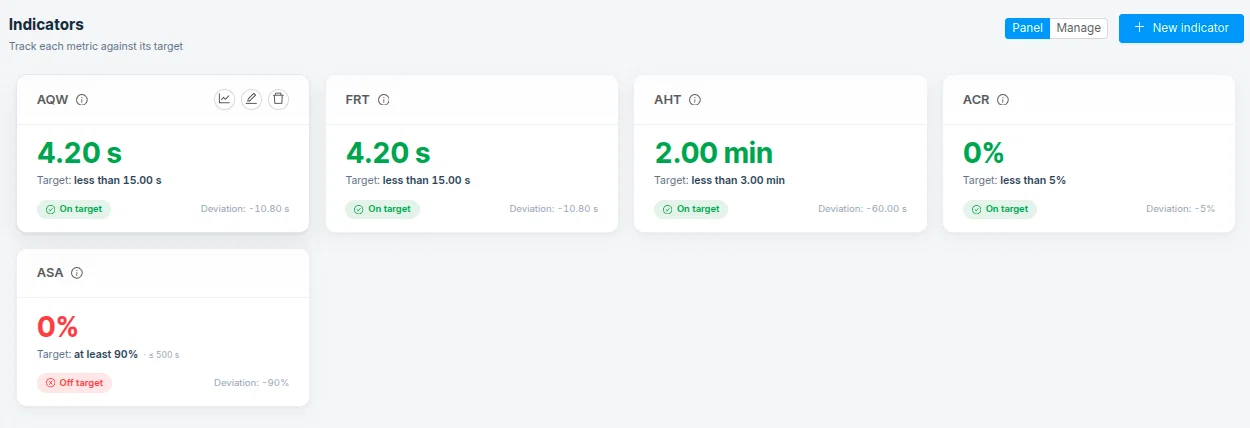
How it helps you
- Set your own target for each indicator (for example, "answer in under 20 seconds").
- See the actual result against your goal, with no math or spreadsheets.
- Follow the daily trend to know whether you're improving or slipping.
- Filter each indicator by segment, service or agent, to measure exactly what matters to you.
- Get a heads-up when a recommended indicator isn't set up yet, with a shortcut to create it.
Available indicators
- Average handle time (AHT): how long your team takes on average to resolve an interaction. Helps you keep efficiency in check and spot when handling drags on.
- First response time (FRT): how long the customer waits for the first response. Helps you protect how quickly you attend to people.
- Abandoned calls rate: what share of customers hang up before being attended. Helps you catch contacts you're losing in the wait.
- Answered within target (ASA): what share of calls you answer within the time you define. Helps you guarantee your service level.
- Average queue wait time: how long your customers wait in line before being attended. Helps you size and manage the wait.